
Convert to VTK#
Export OPM Flow grid and property data to VTK for three-dimensional inspection in ParaView.
Requirements#
OPM Flow is required to generate the grid used by the VTK export. If the
flow executable is not available on PATH, select it with
plopm -fp.
Export selected variables#
Export temperature, FIP regions, total CO2 mass, and liquid-phase CO2 mass fraction for restart steps 0 and 5:
plopm -i SPE11B -v temp,fipnum,co2m,xco2l -vf Float32,UInt16,Float64,Float16 -r 0,5 -m vtk
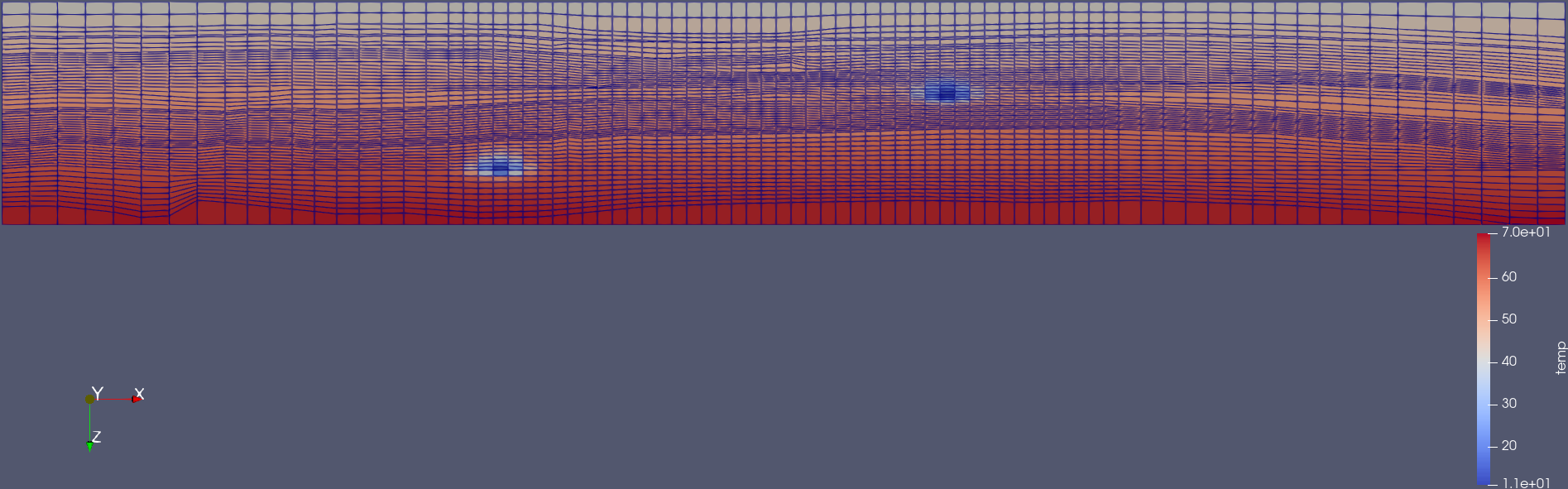
Grid and temperature after 25 years of CO2 injection, viewed in ParaView.#
Select VTK data types#
Use plopm -vf to assign a VTK data type to each variable. The data
types correspond to the variables in the order supplied through
plopm -v:
temp   -> Float32
fipnum -> UInt16
co2m   -> Float64
xco2l  -> Float16
The selected types balance precision and file size:
Float32Stores temperature with single-precision floating-point values.
UInt16Stores the discrete
fipnumregion identifiers as unsigned integers.Float64Preserves higher precision for total CO2 mass.
Float16Reduces storage for the bounded liquid-phase CO2 mass fraction.
Use a wider type when the expected value range or required numerical precision cannot be represented safely by a smaller type.
Select restart steps#
The command uses plopm -r to export the initial state and restart
step 5. plopm writes the selected variables for each requested step so the
results can be inspected or animated in ParaView.
Customize variable names#
Use plopm -vn to assign custom names in the VTK output:
plopm -i SPE11B -v temp,fipnum,co2m,xco2l -vn temperature,fip_region,total_co2_mass,liquid_co2_fraction -vf Float32,UInt16,Float64,Float16 -r 0,5 -m vtk
The number of names supplied through plopm -vn must match the number
of variables selected with plopm -v.
Use a custom Flow executable#
If Flow is installed outside PATH, provide its executable explicitly:
plopm -i SPE11B -v temp,fipnum,co2m,xco2l -vf Float32,UInt16,Float64,Float16 -r 0,5 -m vtk -fp /path/to/flow
See OPM Flow for OPM Flow installation guidance and VTK output for the complete VTK option reference.
Reproduce this example#
Run the complete workflow from the repository root:
. ./tests/scripts/docs_convert_to_vtk.sh