
Wells and faults#
Plot faults and wells declared in the Norne input deck. Apply the same rotation, translation, and cropping values used for the transformed Norne grid so the outputs remain spatially consistent.
Note
Faults and wells must be declared directly in the input deck.
Plot faults#
Plot faults intersecting the first layer and use the whole-model value range:
plopm -i NORNE_ATW2013 -v faults -s ,,1 -rot 65 -tr '[6456335.5,-3476500]' -x '[0,5600]' -y '[0,8800]' -fz 8 -gr 1
Project faults across layers 1 through 22. Use max so a map cell is shown
only when the projected fault condition is present across the selected cells:
plopm -i NORNE_ATW2013 -v faults -s ,,1:22 -rot 65 -tr '[6456335.5,-3476500]' -x '[0,5600]' -y '[0,8800]' -fz 8 -agg max
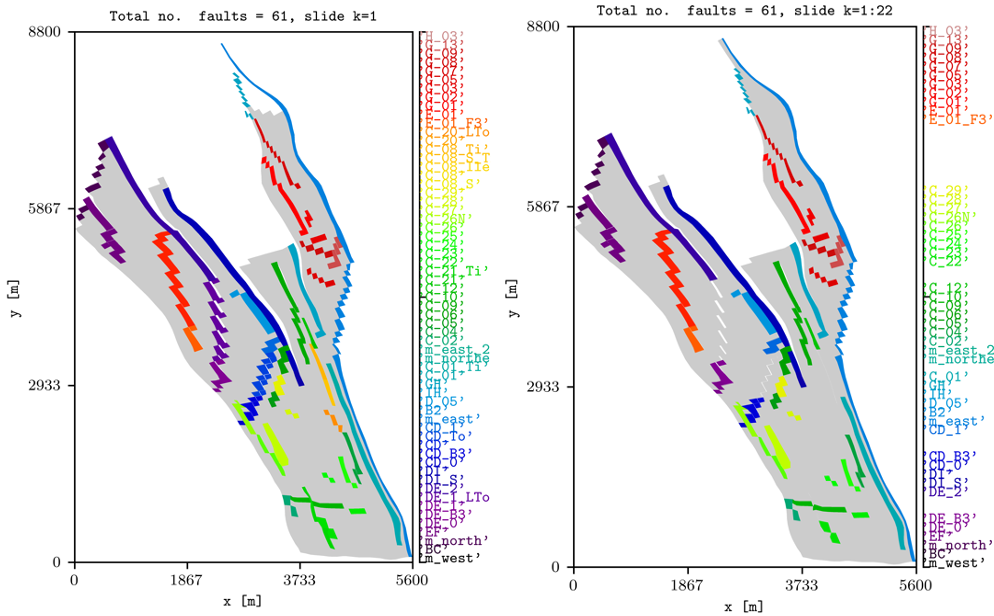
Norne faults on the first layer and projected across the first 22 layers.#
The main options are:
faultsis a special variable selected withplopm -v.plopm -gruses the whole-model range for the first-layer plot.plopm -aggcontrols how faults are combined across a layer range.plopm -rot,plopm -tr,plopm -x, andplopm -yapply the same transformation as the property map.
Plot wells#
Plot all wells declared in the model, regardless of whether they intersect the selected layer:
plopm -i NORNE_ATW2013 -v wells -s ,,1 -rot 65 -tr '[6456335.5,-3476500]' -x '[0,5600]' -y '[0,8800]' -fz 8 -gr 1 -fn norne_wells_global
Plot only the wells intersecting the selected layer:
plopm -i NORNE_ATW2013 -v wells -s ,,1 -rot 65 -tr '[6456335.5,-3476500]' -x '[0,5600]' -y '[0,8800]' -fz 8 -fn norne_wells
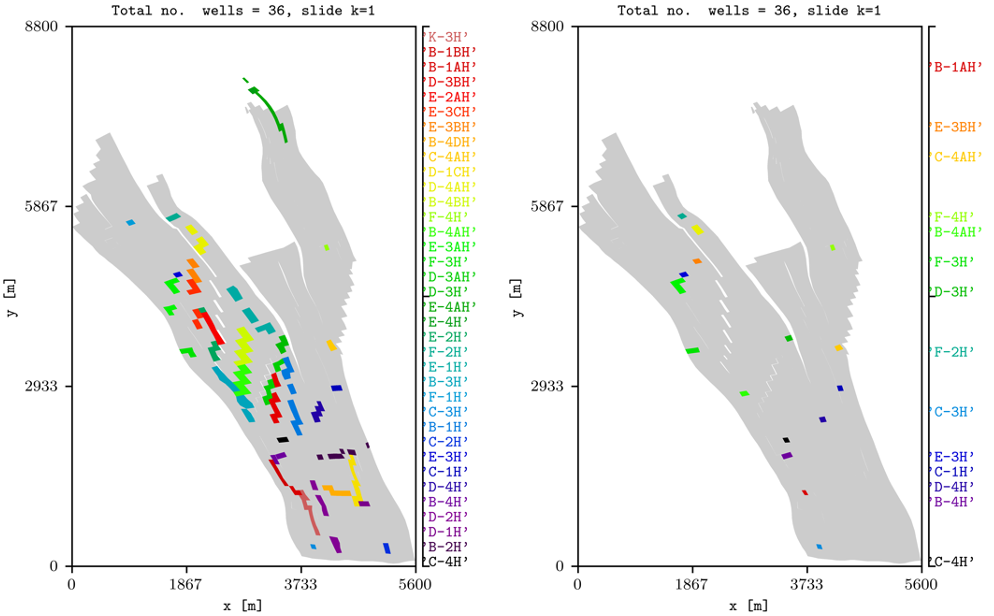
All declared Norne wells and the subset intersecting the first layer.#
For the first command, plopm -gr selects the global well view and
plopm -fn writes norne_wells_global. Without the global-range
selection, the second command restricts the output to wells associated with the
selected layer and writes norne_wells.
See Rotation, translation, and zoom for the original and transformed Norne grid views.
Reproduce this example#
Run the complete workflow from the repository root:
. ./tests/scripts/docs_wells-faults.sh